The Craft of AI
Design MCPs for the Agent, Not the API
Hard-won design principles from shipping 50+ MCP servers in a year.
By Luke Lin · · 6 min read
We've shipped more than 50 MCP servers in the past year. The lesson that mattered most didn't arrive in a single deploy. It showed up as a collection of scars, like badges earned from the battlefield.
We started taking an OpenAPI spec, generating one tool per endpoint, connecting an agent, and watching it get confused about which tool to call and in what order. Claude eventually gets it right, after spending a pile of tokens. ChatGPT gives up after a few tries. Users walk away disillusioned about MCPs entirely.
We did it too, early on. Since then we've put real product sense into how we build, thinking harder about the person on the other end. With the Barndoor MCP Factory, where we cut token use by 95 percent and shipped multiple MCPs a week, we worked out a handful of design principles. Here they are.
The components of an enterprise MCP
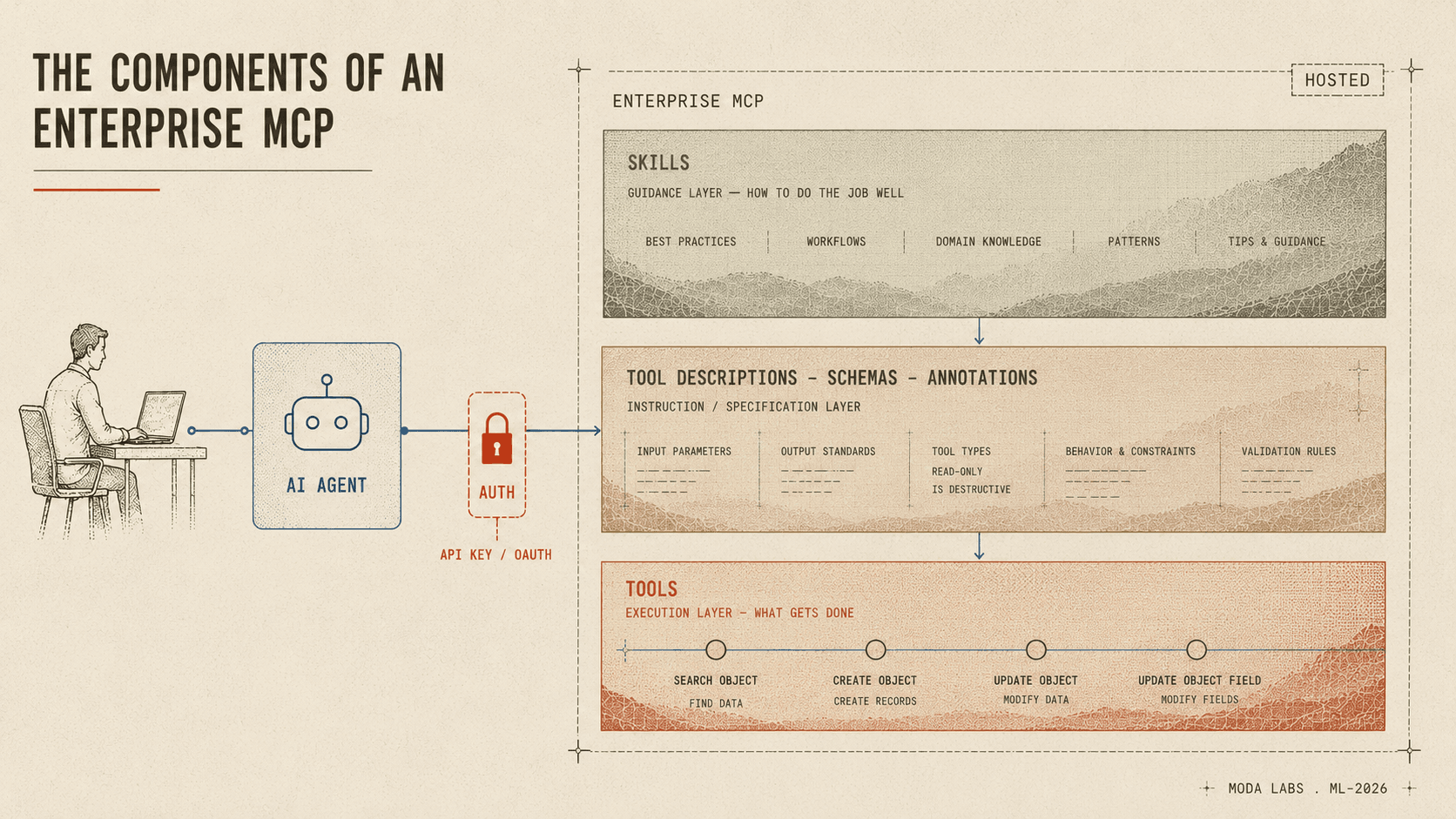
Before the principles, the parts. Picture a workshop.
- Tools are the saws. They usually map to your APIs or to custom queries against your enterprise data, and they're what actually does the cutting.
- Tool descriptions, schemas, and annotations are the instruction manual. They tell the agent how to use each tool, the way a manual tells you how to remove the blade guard on the miter saw before you swap the blade.
- Skills are techniques. You can ship them alongside the MCP, and they teach the agent the best way to get work done with the tools — the difference between knowing a miter saw exists and knowing how to make a clean 15 degree bevel cut with it.
- Runtime and deployment is how the MCP gets called. It can run locally, but most enterprise MCPs are hosted in the cloud so they're always available.
- Auth is the lock on the door. If the MCP reaches into someone's account — your Slack, your Salesforce — it has to know who you are and what you're allowed to touch.
Design patterns we learned on the battlefield
Decide which tools exist, not which endpoints do
The instinct is to expose everything your API can do. Resist it. An agent isn't a developer reading your docs, it's a new kind of user that pays for every token it reads and makes worse choices the more options you put in front of it. Designing for the agent means deciding which jobs it actually has to do, then building tools for those jobs, instead of mirroring every endpoint you happen to own.
However, if you're racing an MCP to market and you already have the APIs, mapping them straight through is still your fastest move. Ship it. You can close most of the gap with well defined skills that teach the agent how to string the raw tools together. Just know you're taking on a debt you'll want to pay down once you see how people actually use it.
Notion learned this in public. Their first MCP server mapped each API endpoint one-to-one to a tool, and they've since written that it caused “high-context token consumption” and poor agent behavior. The rebuilt server ships a smaller set of tools designed for agents, like create-pages and update-page, and returns content as Notion-flavored Markdown so the agent spends fewer tokens per result.
Asana did the same in its v2 server this February, cutting the tool count by more than half because too many tools “overwhelm the context window.”
The cost of all those extra tools is real. Every additional tool is another chance for the agent to grab the wrong one, or call them in the wrong order, on its way to finishing a task.
More tools means more room for error. And each one carries a token cost — tool descriptions, tool schemas, the tool call results. The fewer tools it takes to get a job done, the better the result and the cheaper the run.
The fix for bloat is more expressive tools, not fewer features. Atlassian's Jira MCP exposes searchJiraIssuesUsingJql, a single tool that takes a JQL query, instead of a pile of tools for browsing projects and issues by hand. That one tool is worth more than the pile, but only if its description teaches the agent how to write JQL, which is a choice you make in the annotation, not the code.
Decide what comes back
Input design gets all the attention, and the output is just as load-bearing. It's also where the token bill quietly explodes. Hand an agent raw API JSON full of UUIDs and mime types and it burns context parsing fields it can't use, then hallucinates the ones it can.
Start with what the agent can actually read. Anthropic, writing up its own tool work, found that resolving those UUIDs into natural-language names measurably cut Claude's error rate. They cap tool responses in Claude Code at 25,000 tokens by default and add a response-format toggle so the agent can ask for concise output when it doesn't need the whole object.
When we worked on a Gmail MCP, a single returned email ate about 20,000 tokens. Pull ten emails and you've burned 200k tokens before the agent has done anything useful. We built a code execution sandbox that catches the raw results first and parses them down, which took each email from roughly 20,000 tokens to 200. A growing number of MCPs and agent integrations are shipping with code execution sandboxes for exactly this reason.
That points at the bigger shift. Instead of exposing dozens of tools, you expose a small code API and let the agent write code against it. Anthropic reported one task dropping from 150,000 tokens to 2,000 this way, a 98.7 percent cut, and Cloudflare found the same with what it calls Code Mode.
Back to Jira: the win from JQL isn't only the query going in. It's that the agent gets back a short list of issue keys it can act on, instead of a wall of nested JSON to wade through.
Decide how people get in
Auth is still hard, even in the age of AI. It's where the agent-versus-API gap turns into a security decision.
- An API key is simple because it's already scoped to one user. Paste it and you're done, no consent screen. The cost is that you can't scope it down any further, so the agent inherits everything that user can do.
- OAuth fixes the scoping and adds real complexity. Your customers have to stand up an OAuth app, scope it correctly, public or private, and register it properly with your MCP. It works, and it's more work.
- Dynamic Client Registration is OAuth's convenient shortcut. DCR lets any client register itself at an open endpoint with no human in the loop, which is fine until that endpoint becomes a flooding target, anyone can impersonate a trusted client, and an attacker picks a client name built to fool your users on the consent screen.
Asana dropped DCR in its v2 server for exactly these reasons and moved to pre-registration in a developer console. The MCP maintainers downgraded DCR in the spec from SHOULD to MAY.
Where should you go from here?
More and more work is moving agent-first. From firsthand experience, I love having my agent handle things in Linear, Vercel, and Salesforce without logging into the UI to hunt for the exact screen and button I need.
Should you build an MCP for your customers? If they're using agents, then most definitely yes.
How should you approach it? Product management fundamentals still apply. Build something small that meets a subset of your use cases, keep it simple, and only add complexity where you actually need it. Tal Raviv, who's shipping an MCP for a financial platform, makes the case for starting with atomic, API-mapped tools precisely because curating too early can rule out uses you haven't seen yet. We agree, with one addition: treat that curation as your next release and watch how people actually use the thing to decide what to build.
Whatever you build, be deliberate about your tool descriptions, schemas, and outputs, make auth easy for your customers, and once it's in the wild, set up evals so you can measure how it actually performs and keep improving it.
In the end, you'll be grateful you applied product design principles.
An MCP is more than an API with a new coat of paint. It's a product, and the agent is your newest, most demanding user.
KEEP READING